


StbEmu (Pro)
3.3200.00 Reviews
App Specs
- Version
- v2.0.23.01
- Updated On
- License
- $5.49
- Downloads
- 100,000+
- Developer
- M Vasilchuk
- Categories
- Video Players & Editors
- Platform
- Android
Screenshots
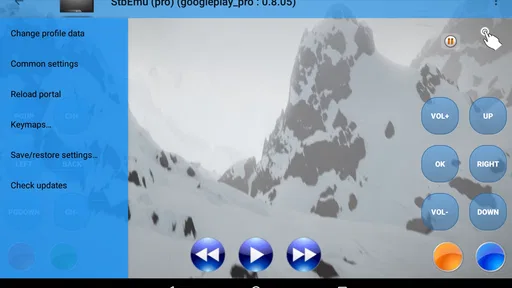
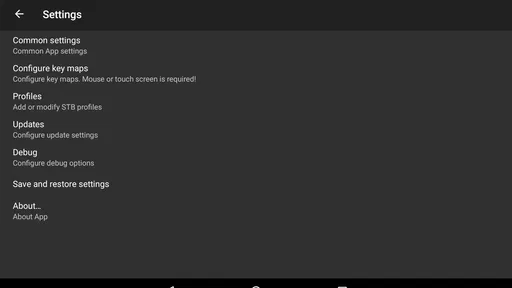
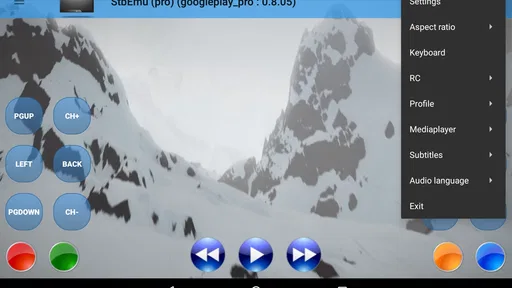
 Analysis by AppCompare
I judge IPTV apps by how much friction they remove between having a legitimate service and watching it comfortably. StbEmu (Pro) is aimed at a specific setup: it emulates certain IPTV set-top boxes rather than acting like a general video editor or a universal streaming library. That distinction matters. If your provider expects a compatible box-style environment, this can be a useful way to access its service on a device you already own. If you simply want to browse a catalog of films and shows, it is probably the wrong tool.
A focused starting point, not a content library
I find the idea easiest to understand by thinking of the app as a bridge between a provider’s portal and a screen. It does not replace the service itself, and it is not a source of channels. You need valid access details from a provider that supports the relevant setup. Before paying for the app, I would ask that provider which portal format and set-top-box profile it expects, then check that those match the configuration you plan to use. That small bit of preparation can save a lot of trial and error.
The paid app is listed at $5.49, and its Everyone age rating makes it broadly suitable from a store-content perspective; that does not mean every IPTV service is appropriate for every household. The app is by M Vasilchuk, sits in the video-player and editing category, and has a 3.5 average from around 1.7 thousand ratings. Those figures suggest a tool with an established audience but also a mixed reception, so I would treat compatibility with your own provider as more important than popularity.
Setting up carefully makes the difference
The first useful step is to keep your provider’s portal address and any configuration instructions somewhere you can refer to while setting up. Entering a slightly incorrect address, choosing an unsuitable device profile, or overlooking a provider-specific setting can look like a streaming failure even when your internet connection is fine. I would change one setting at a time and test after each change; changing several at once makes it much harder to identify what solved—or caused—the problem.
This is also where the emulator approach has a trade-off. A regular streaming app usually gives you a familiar account sign-in and a polished catalog, while StbEmu (Pro) assumes you are willing to think in terms of a portal and a virtual set-top box. That extra setup can be worthwhile for someone whose provider depends on that model, but it is needless complexity if your service already has a straightforward official app.
What to expect in day-to-day use
Once the service is configured, the appeal is practical: you can use a compatible Android device as the viewing endpoint instead of relying only on a dedicated box. For example, if I wanted to watch a provider’s live channels on a spare screen at home, I would first confirm the provider permits this kind of access, set up the portal, and then test a few channels before settling in. That test is more revealing than assuming the first successful launch means every channel and program guide will behave the same way.
When playback stalls, I would separate the possible causes rather than immediately blaming the emulator. Check whether the same service works on the provider’s own device or app, whether the network is stable, and whether the issue affects one channel or everything. If only one stream has trouble, the source may be the channel or provider; if every stream fails, revisit the portal and device profile. This simple diagnostic routine is especially helpful because the app depends on an external IPTV service for the actual content and stream delivery.
Worth Reading Before You Choose

EA SPORTS FC Mobile 26 Is a Bigger Football Game, but It Takes Time

Flipboard Shows What News Apps Must Do Beyond the Feed

Switching to Android Auto Means Rethinking Your Driving Routine

Google Calendar Makes a Crowded Week Easier to Manage

Ludo King Makes the Most of the Minutes Between Plans

Baby Panda World Brings Quick Play to Modern Phones, but Its Game Library Feels Busy
Who should choose it—and who should pass
I would consider it if I already had a legitimate IPTV subscription, knew that the provider supports a compatible set-top-box profile, and wanted to use an Android device for access. It may also suit a household that values a box-style interface over the browsing experience of a conventional streaming service. The key question is not whether an emulator sounds flexible, but whether it fits the provider you actually use.
I would skip it if I expected channels to be included, wanted a plug-and-play entertainment app, or did not have portal details from a provider. I would also favor the provider’s own app when it offers the same channels with less setup or when the provider gives support only for its official hardware. That is not a weakness unique to this product; it is the practical cost of choosing an emulator instead of a provider-managed client.
Getting Started with StbEmu (Pro)
When I first heard about StbEmu (Pro), I was a bit skeptical. After all, there are countless apps on the market claiming to offer seamless IPTV services. But, curiosity got the better of me, and I decided to give it a whirl.
The installation process was a breeze. Once you download the app from the Play Store, you're basically good to go. The app’s interface, although not the flashiest, is straightforward. You don’t need to be a tech wizard to navigate through it. That's a win in my book!
Setting Up Your IPTV Portal
Now, here’s where it gets interesting. Setting up your IPTV portal might seem daunting at first, but trust me, it’s simpler than it sounds. You’ll need a portal URL from your IPTV provider. Once you have that, plug it into the app, and voila! You’re all set to stream.
One thing I appreciate about StbEmu (Pro) is its flexibility. It supports a variety of STB models, so chances are, whatever setup you have at home, this app has got you covered.
Streaming Quality and User Experience
When it comes to streaming quality, StbEmu (Pro) doesn’t disappoint. The video quality is crisp, and I didn’t experience any buffering issues, which is a breath of fresh air. I was able to watch my favorite shows without any interruptions, and that’s something I can get behind.
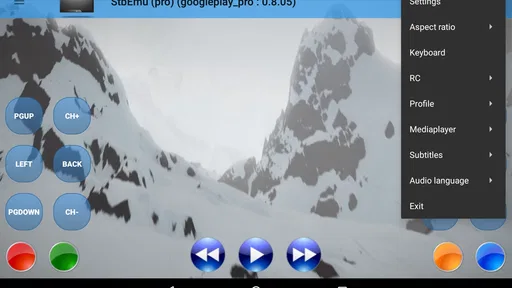
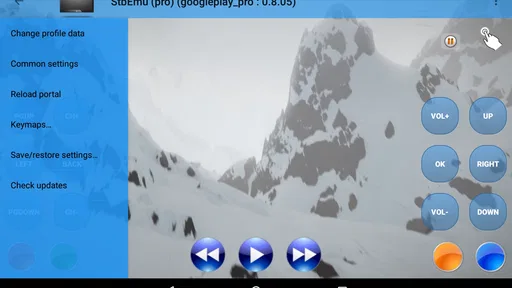
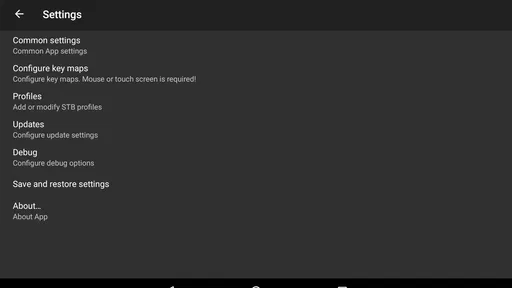
One of the aspects I found particularly useful was the ability to customize the interface. You can adjust the settings to suit your preferences, whether it’s the layout or the resolution. This is especially handy if you’re someone who likes to tailor your streaming experience.
Features Worth Highlighting
Now, let's talk features. This app is packed with them. From parental controls to manage what the little ones are watching, to multi-screen features that let you watch different channels simultaneously, it’s clear that the developers have put a lot of thought into making this app versatile.
Another feature that deserves a shoutout is the ability to record live TV. This is a game-changer for those moments when you want to save something for later. Plus, the Electronic Program Guide (EPG) is intuitive and makes it easy to keep track of what’s on.
Putting the workflow to work
For a realistic evening routine, I would set up the portal before anyone is waiting to watch, confirm that the guide has populated, and test the channel the household uses most. Then I would leave the configuration alone unless there is a clear problem. This avoids the familiar trap of tweaking settings during a live program and losing track of which change mattered. If a family member is using the app, I would also check the parental controls together rather than assume the default arrangement matches the household’s needs.
There is a useful distinction between getting a picture and having a dependable viewing setup. A stream that opens once is not enough to prove that the guide, channel switching, and any provider-specific functions will all work as expected. I would test the ordinary workflow—open the app, find a familiar channel, move to another one, and return—before relying on it for a time-sensitive broadcast. This is a low-effort check that can prevent frustration later.
Small checks that prevent setup headaches
If you use more than one compatible device, keep a private note of the portal information and the settings that actually worked on each one. That is more useful than repeatedly guessing when moving between a television and a mobile device, since a configuration that feels comfortable on one screen may not be ideal on another. Avoid sharing access details casually, and use only credentials and services you are authorized to use.
It is also sensible to distinguish picture quality from service reliability. A sharp image depends on the stream supplied by the provider, the network, and the device as well as the player. If playback becomes inconsistent, compare another channel and, where possible, another device before changing several options. That approach helps identify whether the issue follows a particular stream, the connection, or the local setup. The emulator can make compatible access possible, but it cannot repair a weak source or an unstable network.
Where the emulator trade-off shows up
Compared with a standard video player, which typically opens local files or familiar media sources, this app is organized around reproducing a set-top-box environment for IPTV. Compared with an official provider app, it may offer a route for a provider’s box-oriented service on Android, but it also asks the user to handle more configuration. I would choose the simpler official client whenever it gives me the same access and support; I would choose an emulator only when the provider’s setup makes that flexibility worthwhile.
That makes the app a poor match for people who want one place to discover new shows, manage a general video library, or start watching without arranging a subscription. It is also not a substitute for checking the provider’s terms: having an emulator does not grant access to channels. For a technically comfortable viewer, the portal-based workflow can be manageable. For someone who mainly wants an effortless remote-control experience, a dedicated box or official app is likely the calmer option.
Version, support expectations, and value
The current release is v2.0.20.01 and it requires Android 7.0 or later. I would check that requirement before buying, especially if the intended device is an older tablet or television box. The app has been available since June 29, 2016, and has more than 100 thousand installs, so it is not an obscure new experiment; still, that history should not be mistaken for a promise that every provider configuration will work identically.
At $5.49, I would weigh the one-time app cost against the usefulness of running a compatible service on the device I already have. The value is strongest when the provider specifically supports this style of access and I plan to use it regularly. If I am only curious and have not confirmed compatibility, I would ask the provider first rather than pay and hope. The 192 written reviews alongside its middling average rating reinforce my practical advice: evaluate the fit with your own setup, not just the headline reputation.
One question people often have is whether they can start watching without a provider. In practical terms, the app is an emulator, not a channel subscription, so you need authorized service access and the relevant portal details. Another is whether it replaces a set-top box completely: that depends on the provider’s support and the device you intend to use, so I would verify those before rearranging a living-room setup. For recording, multi-screen viewing, and parental controls, I would test the options against the provider and device in front of me instead of assuming each function behaves the same in every configuration.
Final Thoughts
So, is StbEmu (Pro) worth it? In my opinion, absolutely. It’s a solid choice for anyone looking to streamline their IPTV experience. The app offers a well-rounded set of features, reliable performance, and a user-friendly interface.
Whether you're a seasoned IPTV user or just dipping your toes in the water, this app is a great companion for all your streaming needs. Give it a try, and see if it fits your lifestyle as well as it did mine.
My recommendation is more specific than a blanket yes: I would buy it when I already know my provider supports the relevant box-style configuration and I want that access on Android. I would not choose it as a first streaming app or as a way to find content. Treat the portal setup as part of the service, test the everyday controls before depending on it, and the emulator’s purpose becomes clear. For the right IPTV household, that focused role can be useful; for everyone else, a provider’s simpler official app is likely the better starting point.
Pros
- Supports a wide range of IPTV services.
- User-friendly interface for easy navigation.
- Highly customizable settings for advanced users.
- Frequent updates enhance functionality.
- Compatible with most Android devices.
Cons
- Requires technical knowledge to set up.
- Some features hidden behind a paywall.
- Occasional stability issues on older devices.
- Limited customer support availability.
- Setup process can be time-consuming.
FAQs for StbEmu (Pro)
What is StbEmu (Pro) and how does it work?
StbEmu (Pro) is an application designed to emulate IPTV set-top boxes, allowing users to stream TV channels and content over the internet. It supports various IPTV services and provides a user-friendly interface to manage playlists and settings. Users need to configure the app with the correct server information to access their IPTV subscriptions.
Is StbEmu (Pro) compatible with all IPTV services?
StbEmu (Pro) can be configured to work with most IPTV services that support the MAG device emulation. However, compatibility may vary depending on the specific service and its protocols. It's crucial to check with your IPTV provider to ensure that their service is compatible with MAG emulation before proceeding with StbEmu (Pro).
What are the main differences between StbEmu (Pro) and its free version?
StbEmu (Pro) offers additional features and enhancements compared to the free version. These include an ad-free experience, more customizable settings, and improved performance. The Pro version is ideal for users who require a more robust and uninterrupted streaming experience. Both versions, however, require proper configuration with IPTV credentials.
How difficult is it to set up StbEmu (Pro) for first-time users?
Setting up StbEmu (Pro) can be a bit challenging for first-time users, especially those unfamiliar with IPTV configurations. The app requires users to input detailed server information, MAC addresses, and other settings. Fortunately, many online guides and tutorials are available to assist with the setup process, making it manageable with some patience.
Does StbEmu (Pro) offer customer support if I encounter issues?
StbEmu (Pro) does not offer direct customer support. However, users can find help through various online communities and forums where experienced users share tips and troubleshooting advice. It's also advisable to consult the app's official documentation and any available FAQs for guidance on common issues and solutions.


